A full application
Download the full code of this example.
see the full source for: application
The firefox network configuration
Now we are going to resume everything we have seen with a concrete example.
We’re going to take an example based on the Mozilla Firefox proxy’s
configuration, like what is required when you open the network settings in
the General configuration’s firefox page:
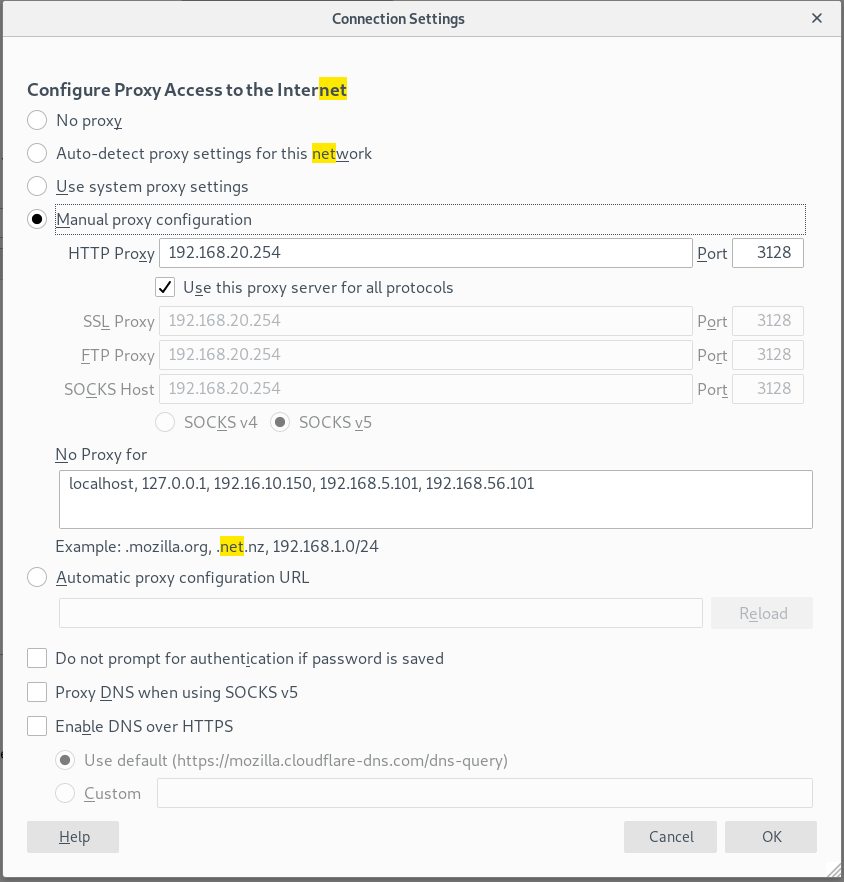
The firefox configuration
First, let’s create our options :
1 2 3 4 5 6 7 8 9 | from tiramisu import Config, OptionDescription, IPOption, PortOption, BoolOption, ChoiceOption, DomainnameOption, StrOption, Params, ParamOption
proxy_mode = ChoiceOption('proxy_mode', 'Proxy\'s config mode', ('No proxy',
'Auto-detect proxy settings for this network',
'Use system proxy settings',
'Manual proxy configuration',
'Automatic proxy configuration URL'),
default = 'No proxy', properties=('mandatory', ))
# this option's value will determine which of the others options are frozen and which are not thanks
# to the 'requires' instructions in their declaration
|
This first option is the most important one : its value will determine which other options are frozen and which are not. The same thing will happen with other options later. Here are the others options we’ll be using :
1 2 3 4 5 6 7 8 9 10 11 12 13 14 15 16 17 18 19 20 21 22 23 24 25 | http_ip = IPOption('http_ip_address', 'Proxy\'s HTTP IP', default='192.168.20.1')
http_port = PortOption('http_port', 'Proxy\'s HTTP Port', default='8080')
use_for_all_protocols = BoolOption('use_for_all_protocols', 'Use HTTP IP and Port for all protocols ?', default = True)
# if this option is valued with 'True', the callbacks below will set all the others IP and port values
# to the same as HTTP IP and port.
ssl_ip = IPOption('ssl_ip_address', 'Proxy\'s SSL IP', callback=protocols_settings, callback_params=Params((ParamOption(use_for_all_protocols), ParamOption(http_ip))), properties=('force_default_on_freeze',), requires = [{'option': use_for_all_protocols, 'expected': True, 'action':'frozen'}])
ssl_port = PortOption('ssl_port', 'Proxy\'s SSL Port', callback=protocols_settings, callback_params=Params((ParamOption(use_for_all_protocols), ParamOption(http_port))), properties=('force_default_on_freeze',), requires = [{'option': use_for_all_protocols, 'expected': True, 'action':'frozen'}])
ftp_ip = IPOption('ftp_ip_address', 'Proxy\'s FTP IP', callback=protocols_settings, callback_params=Params((ParamOption(use_for_all_protocols), ParamOption(http_ip))), properties=('force_default_on_freeze',), requires = [{'option': use_for_all_protocols, 'expected': True, 'action':'frozen'}])
ftp_port = PortOption('ftp_port', 'Proxy\'s FTP Port', callback=protocols_settings, callback_params=Params((ParamOption(use_for_all_protocols), ParamOption(http_port))), properties=('force_default_on_freeze',), requires = [{'option': use_for_all_protocols, 'expected': True, 'action':'frozen'}])
socks_host_ip = IPOption('socks_host_ip_address', 'Proxy\'s SOCKS Host IP', default=None, callback=protocols_settings, callback_params=Params((ParamOption(use_for_all_protocols), ParamOption(http_ip))), properties=('force_default_on_freeze',), requires = [{'option': use_for_all_protocols, 'expected': True, 'action':'frozen'}])
socks_host_port = PortOption('socks_host_port', 'Proxy\'s SOCKS Host Port', default=None,callback=protocols_settings, callback_params=Params((ParamOption(use_for_all_protocols), ParamOption(http_port))), properties=('force_default_on_freeze',), requires = [{'option': use_for_all_protocols, 'expected': True, 'action':'frozen'}])
socks_version = ChoiceOption('socks_version', 'SOCKS version used by proxy', ('v4', 'v5'), default = 'v5', requires = [{'option': use_for_all_protocols, 'expected': True, 'action':'frozen'}])
no_proxy = DomainnameOption('no_proxy', 'IP addresses and domain names for which proxy will be desactivated', multi = True, allow_ip = True , requires = [{'option': proxy_mode, 'expected': 'No proxy', 'action':'disabled'}])
auto_config_url = StrOption('auto_config_url','Proxy\'s auto config URL', requires = [{'option': proxy_mode, 'expected': 'Automatic proxy configuration URL', 'action':'disabled', 'inverse':True}])
prompt_authentication = BoolOption('prompt_authentication', 'Prompt for authentication if password is saved ?', default = True)
use_proxy_dns_socks5 = BoolOption('use_proxy_dns_socks5', 'Use Proxy DNS when using SOCKS v5 ?', default = False,requires = [{'option': socks_version, 'expected': 'v5', 'action':'disabled', 'inverse': True}] )
enable_dns_over_https = BoolOption('enable_dns_over_https', 'Enable DNS over HTTPS ?', default = False)
used_dns = ChoiceOption('used_dns', 'Used DNS', ('default', 'custom'), requires = [{'option': enable_dns_over_https, 'expected': False, 'action': 'frozen'}])
custom_dns_url = StrOption('custom_dns_url', 'Custom DNS URL', requires = [{'option': used_dns, 'expected': 'custom', 'action':'disabled', 'inverse': True}])
|
As you can see, we’re using Callbacks, requirements and properties in the setting of our options, because we have many options which value or accessibility is depending on the value of other options.
Now we need to create OptionDescriptions and configs :
1 2 3 4 5 | protocols = OptionDescription('protocols', 'Protocols parameters', [http_ip, http_port, use_for_all_protocols, ssl_ip, ssl_port, ftp_ip, ftp_port, socks_host_ip, socks_host_port, socks_version], requires = [{'option': proxy_mode, 'expected': 'No proxy', 'action':'disabled'}])
rootod = OptionDescription('proxy', 'Proxy parameters', [proxy_mode, no_proxy, prompt_authentication, use_proxy_dns_socks5, enable_dns_over_https, custom_dns_url, used_dns, protocols, auto_config_url])
proxy_config = Config(rootod)
proxy_config.property.read_write()
|
As you can see, we regrouped a lot of options in ‘protocols’, so we can set a ‘requires’ instruction that is needed by all those options. This way, we don’t have to put the instruction on every option one by one.
Now that we have our Config, it’s time to run some tests ! Here are a few code blocks you can test and the results you should get :
1 2 3 4 5 6 7 8 | #Auto config with URL
proxy_config.option('proxy_mode').value.set('Automatic proxy configuration URL')
proxy_config.option('auto_config_url').value.set('192.168.20.2')
print('New proxy configuration :', proxy_config.option('proxy_mode').value.get())
print('Automatic proxy configuration URL :', proxy_config.option('auto_config_url').value.get())
New proxy configuration : Automatic proxy configuration URL
Automatic proxy configuration URL : 192.168.20.2
|
1 2 3 4 5 6 7 8 9 10 11 12 13 14 15 16 17 18 19 | # Auto config for a network
proxy_config.option('proxy_mode').value.set('Auto-detect proxy settings for this network')
proxy_config.option('no_proxy').value.set(['127.0.0.1', 'mozilla.org'])
proxy_config.option('use_proxy_dns_socks5').value.set(True)
proxy_config.option('enable_dns_over_https').value.set(True)
proxy_config.option('used_dns').value.set('default')
print('New proxy configuration :', proxy_config.option('proxy_mode').value.get())
print('No proxy for :', proxy_config.option('no_proxy').value.get())
print('Prompt for authentication : ', proxy_config.option('prompt_authentication').value.get())
print('Use Proxy DNS when usinf SOCKS v5 :', proxy_config.option('use_proxy_dns_socks5').value.get())
print('Enable DNS over HTTPS :', proxy_config.option('enable_dns_over_https').value.get())
print('Used DNS :', proxy_config.option('used_dns').value.get())
New proxy configuration : Auto-detect proxy settings for this network
No proxy for : ['127.0.0.1', 'mozilla.org']
Prompt for authentication : True
Use Proxy DNS when usinf SOCKS v5 : True
Enable DNS over HTTPS : True
Used DNS : default
|
1 2 3 4 5 6 7 8 9 10 11 12 13 14 15 16 17 18 19 20 21 22 23 24 25 26 27 28 29 30 31 32 33 34 35 36 37 38 39 40 41 42 43 44 45 46 47 48 49 | # Manual configuration
proxy_config.option('proxy_mode').value.set('Manual proxy configuration')
proxy_config.option('protocols.http_ip_address').value.set('192.168.20.1')
proxy_config.option('protocols.http_port').value.set('8080')
proxy_config.option('protocols.use_for_all_protocols').value.set(False)
proxy_config.option('protocols.ssl_ip_address').value.set('192.168.20.3')
proxy_config.option('protocols.ssl_port').value.set('2020')
proxy_config.option('protocols.ftp_ip_address').value.set('192.168.20.4')
proxy_config.option('protocols.ftp_port').value.set('1010')
proxy_config.option('protocols.socks_host_ip_address').value.set('192.168.20.5')
proxy_config.option('protocols.socks_host_port').value.set('3030')
proxy_config.option('protocols.socks_version').value.set('v4')
proxy_config.option('no_proxy').value.set(['127.0.0.1', 'mozilla.org'])
proxy_config.option('enable_dns_over_https').value.set(True)
proxy_config.option('used_dns').value.set('custom')
proxy_config.option('custom_dns_url').value.set('dns-url.com')
print('New proxy configuration : ', proxy_config.option('proxy_mode').value.get())
print('HTTP IP address :', proxy_config.option('protocols.http_ip_address').value.get())
print('HTTP port : ', proxy_config.option('protocols.http_port').value.get())
print('Use HTTP address and port for all protocols :', proxy_config.option('protocols.use_for_all_protocols').value.get())
print('SSL IP address : ', proxy_config.option('protocols.ssl_ip_address').value.get())
print('SSL port : ', proxy_config.option('protocols.ssl_port').value.get())
print('FTP IP address : ', proxy_config.option('protocols.ftp_ip_address').value.get())
print('FTP port: : ', proxy_config.option('protocols.ftp_port').value.set('1010'))
print('SOCKS host IP address : ', proxy_config.option('protocols.socks_host_ip_address').value.get())
print('SOCKS host port : ', proxy_config.option('protocols.socks_host_port').value.get())
print('SOCKS version : ', proxy_config.option('protocols.socks_version').value.get())
print('No proxy for : ', proxy_config.option('no_proxy').value.get())
print('Prompt for authentication : ', proxy_config.option('prompt_authentication').value.get())
print('Enable DNS over HTTPS : ', proxy_config.option('enable_dns_over_https').value.get())
print('Used DNS : ', proxy_config.option('used_dns').value.get())
print('Custom DNS URL : ', proxy_config.option('custom_dns_url').value.get())
New proxy configuration : Manual proxy configuration
HTTP IP address : 192.168.20.1
HTTP port : 8080
Use HTTP address and port for all protocols : False
SSL IP address : 192.168.20.3
SSL port : 2020
FTP IP address : 192.168.20.4
FTP port: : None
SOCKS host IP address : 192.168.20.5
SOCKS host port : 3030
SOCKS version : v4
No proxy for : ['127.0.0.1', 'mozilla.org']
Prompt for authentication : True
Enable DNS over HTTPS : True
Used DNS : custom
Custom DNS URL : dns-url.com
|
1 2 3 4 5 6 7 8 9 10 11 12 13 14 15 16 17 18 19 20 21 22 23 24 25 26 27 28 29 30 31 32 33 34 35 36 37 38 39 40 41 42 43 44 45 46 47 48 49 50 51 52 53 54 55 56 57 58 59 60 61 62 63 64 65 | proxy_config.option('proxy_mode').value.set('Manual proxy configuration')
proxy_config.option('protocols.http_ip_address').value.set('192.168.20.1')
proxy_config.option('protocols.http_port').value.set('8080')
proxy_config.option('protocols.use_for_all_protocols').value.set(False)
proxy_config.option('protocols.ssl_ip_address').value.set('192.168.20.3')
proxy_config.option('protocols.ssl_port').value.set('2020')
proxy_config.option('protocols.ftp_ip_address').value.set('192.168.20.4')
proxy_config.option('protocols.ftp_port').value.set('5050')
proxy_config.option('protocols.socks_host_ip_address').value.set('192.168.20.5')
proxy_config.option('protocols.socks_host_port').value.set('3030')
proxy_config.option('protocols.socks_version').value.set('v4')
print('Before activating "use_for_all_protocols"')
print('New proxy configuration : ', proxy_config.option('proxy_mode').value.get())
print('HTTP IP address :', proxy_config.option('protocols.http_ip_address').value.get())
print('HTTP port : ', proxy_config.option('protocols.http_port').value.get())
print('Use HTTP address and port for all protocols :', proxy_config.option('protocols.use_for_all_protocols').value.get())
print('SSL IP address : ', proxy_config.option('protocols.ssl_ip_address').value.get())
print('SSL port : ', proxy_config.option('protocols.ssl_port').value.get())
print('FTP IP address : ', proxy_config.option('protocols.ftp_ip_address').value.get())
print('FTP port: : ', proxy_config.option('protocols.ftp_port').value.get())
print('SOCKS host IP address : ', proxy_config.option('protocols.socks_host_ip_address').value.get())
print('SOCKS host port : ', proxy_config.option('protocols.socks_host_port').value.get())
print('SOCKS version : ', proxy_config.option('protocols.socks_version').value.get())
print('')
proxy_config.option('protocols.use_for_all_protocols').value.set(True)
print('After activating "use_for_all_protocols"')
print('HTTP IP address :', proxy_config.option('protocols.http_ip_address').value.get())
print('HTTP port : ', proxy_config.option('protocols.http_port').value.get())
print('Use HTTP address and port for all protocols :', proxy_config.option('protocols.use_for_all_protocols').value.get())
print('SSL IP address : ', proxy_config.option('protocols.ssl_ip_address').value.get())
print('SSL port : ', proxy_config.option('protocols.ssl_port').value.get())
print('FTP IP address : ', proxy_config.option('protocols.ftp_ip_address').value.get())
print('FTP port: : ', proxy_config.option('protocols.ftp_port').value.get())
print('SOCKS host IP address : ', proxy_config.option('protocols.socks_host_ip_address').value.get())
print('SOCKS host port : ', proxy_config.option('protocols.socks_host_port').value.get())
print('SOCKS version : ', proxy_config.option('protocols.socks_version').value.get())
"""
Before activating "use_for_all_protocols"
New proxy configuration : Manual proxy configuration
HTTP IP address : 192.168.20.1
HTTP port : 8080
Use HTTP address and port for all protocols : False
SSL IP address : 192.168.20.3
SSL port : 2020
FTP IP address : 192.168.20.4
FTP port: : 5050
SOCKS host IP address : 192.168.20.5
SOCKS host port : 3030
SOCKS version : v4
After activating "use_for_all_protocols"
HTTP IP address : 192.168.20.1
HTTP port : 8080
Use HTTP address and port for all protocols : True
SSL IP address : 192.168.20.1
SSL port : 8080
FTP IP address : 192.168.20.1
FTP port: : 8080
SOCKS host IP address : 192.168.20.1
SOCKS host port : 8080
SOCKS version : v4
"""
|